
 Collin Beck
Attention to detail can make all the difference in user experience.
A Baffling User Experience Lesson: The Parental Gate That Almost Wasn’t
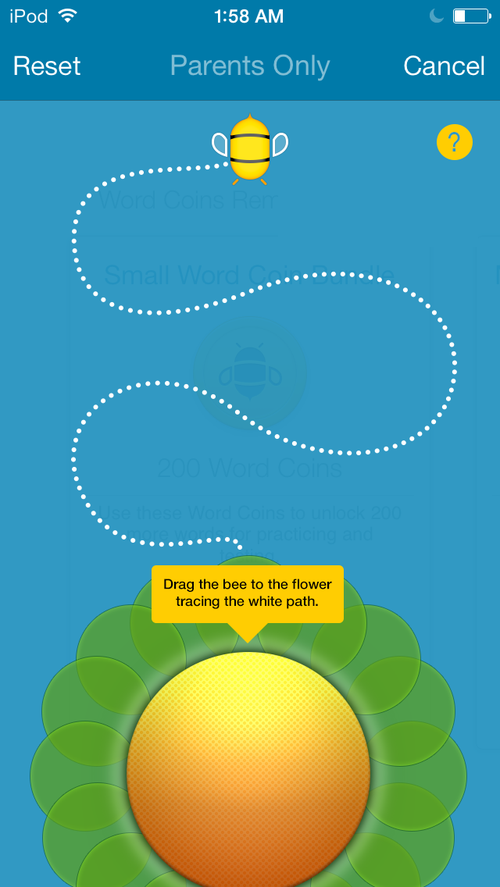
When developing Spelling Pro, a bee-themed children's spelling app, Apple introduced a new guideline for apps in the Kids category: in-app purchases had to be protected by a "parental gate" to prevent young children from accidentally (or intentionally) buying things. Apple left the implementation up to developers, without specifying exactly how it should work.
To fit the app's playful bee theme, we created a simple gate: a bee at the top of the screen, a flower at the bottom, and an S-shaped dashed line connecting them. Clear instructions appeared at the bottom: "Drag the bee to the flower tracing the white path." It seemed intuitive and on-brand. We shipped the update to beta testers, confident it would work.
Feedback came back quickly: the parental gate was too hard—users couldn't figure it out. My client and I were puzzled. How could something so straightforward confuse people?
Hands-On User Testing Reveals the Truth
I headed to the common area of my co-working space (Geekdom in San Antonio) and recruited five random adults to test it. I set the scenario: "You're a parent wanting to unlock more spelling levels for your child via in-app purchase. Go ahead and try."
All five failed initially, handing the phone back in frustration after just a few seconds. Watching them, I noted four key patterns:
- No one read the instructions without prompting.
- Most tapped randomly on the flower when stuck, hoping for feedback.
- They gave up extremely quickly—patience for unclear interfaces is low.
- Once I pointed out the instructions, they completed the task easily but often felt embarrassed, assuming they were the problem.
This was eye-opening. The design looked cute and thematic, but it didn't guide users intuitively.
Iterative Fixes Through Experimentation
Back at my desk, I realized the core mechanic (dragging along the path) was solid—users succeeded instantly once they knew what to do. The issue was discoverability: how to signal interactivity without relying on text.
Iteration 1: I made the bee wiggle subtly whenever the user tapped anywhere on the screen. Tested with five new people: 3 out of 5 succeeded immediately (the tappers noticed the animation and realized the bee was draggable). The other two still quit quickly.
Iteration 2: I added an automatic wiggle every 2–3 seconds, even without taps, while keeping the tap-triggered animation. Tested with five more people: All 5 passed without any hints. The subtle movement drew their eyes to the bee, signaling "this is interactive—try touching me!”
The final version worked flawlessly in further tests.
Key UX Lessons Learned
- Users aren't "wrong"—your design is. As Steve Jobs famously said, "Design is not just what it looks like and feels like. Design is how it works." Our gate looked great but failed in practice until that small animation made it work intuitively.
- Never assume people will read instructions. Text is a last resort; visual cues (like subtle animations) guide behavior far better.
- Test early and often with real users. Without those 15 hallway tests, we might have scrapped the bee theme entirely and wasted time on a completely new concept. In reality, the design was 95% there—a tiny tweak made it 100%.
- Users blame themselves for bad design. Many testers felt stupid for not "getting it" at first. Always reassure them: "I'm testing the app, not you.”
- Small changes can have big impact. A simple auto-wiggle turned failure into success. Good UX often comes from quick, low-cost iterations based on observation. We are always learning.
- Patience is scarce. People abandon confusing experiences in seconds. Make interactions discoverable from the start.
This experience was humbling but invaluable. Observing real users interact with your work shatters assumptions and leads to truly effective designs. User experience isn't about making things pretty—it's about making them effortless. And the good news? The fixes are often simpler than you think.
Gallery
December 15, 2025

Free initial consultation
Want to talk?
We'd love to hear from you